I. Composite — Structural Pattern
The Composite pattern is a structural design pattern that lets you compose objects into tree structures to represent part-whole hierarchies. It allows clients to treat individual objects and groups of objects uniformly.
The key idea behind Composite is "has-a" over "is-a" — instead of inheriting from a base class, objects hold references to other objects of the same interface. This makes it natural to model recursive, tree-like structures where leaves and branches behave the same way from the outside.
Use Composite when:
- You need to represent a hierarchy of objects (e.g. file systems, UI components, org charts)
- You want to treat individual items and containers of items the same way
- You want to apply operations recursively across a tree without special-casing leaf vs. branch
II. Real-world Example
Imagine a file system with folders and files:
- A
Foldercan contain multipleFileitems and nestedFolderitems
- A
Fileis a leaf — it has no children
- Both
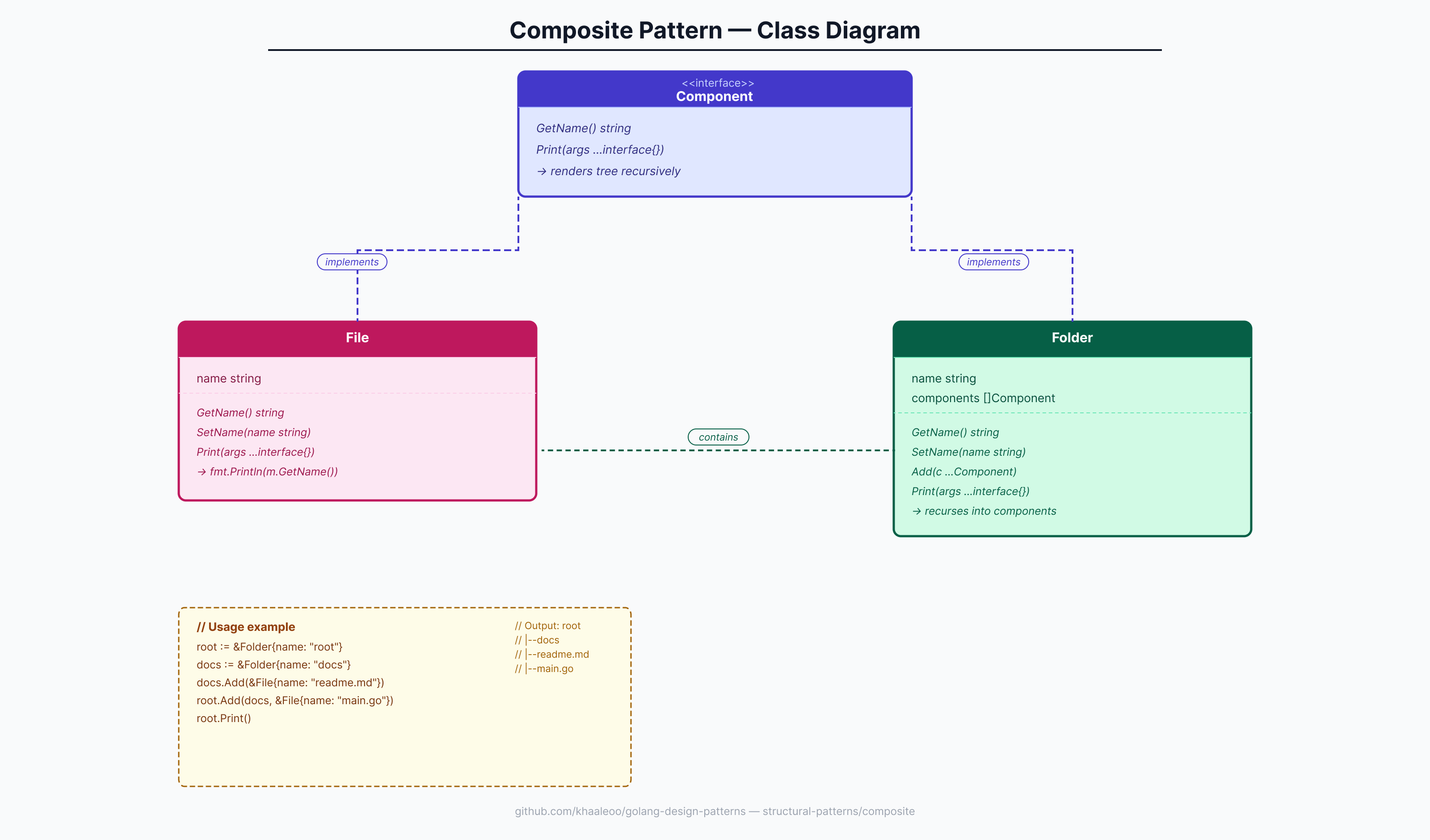
FolderandFilesupport the same operations:GetName()andPrint()
- When you call
Print()on aFolder, it recursively prints all of its children, indented by depth level
- The client code doesn't need to know whether it's dealing with a leaf or a composite — it just calls
Print()
III. Implementation
component.go — the shared interface
package composite
type Component interface {
GetName() string
Print(args ...interface{})
}file.go — the leaf node
package composite
import (
"fmt"
)
type File struct {
name string
}
func (m *File) GetName() string {
return m.name
}
func (m *File) SetName(name string) {
m.name = name
}
func (m *File) Print(args ...interface{}) {
fmt.Println(m.GetName())
}folder.go — the composite node
package composite
import (
"fmt"
"log"
"strings"
)
type Folder struct {
name string
components []Component
}
func (m *Folder) GetName() string {
return m.name
}
func (m *Folder) SetName(name string) {
m.name = name
}
func (m *Folder) Print(args ...interface{}) {
fmt.Println(m.name)
nested := 0
if len(args) > 0 {
var ok bool
nested, ok = args[0].(int)
if !ok {
log.Fatal("first argument must be a number")
}
}
for _, s := range m.components {
fmt.Printf("%s%s%s", strings.Repeat(" ", nested), strings.Repeat(" ", nested), "|--")
s.Print(nested + 1)
}
}
func (m *Folder) Add(c ...Component) {
m.components = append(m.components, c...)
}IV. Explain the example above
Let's trace through a concrete usage:
root := &Folder{name: "root"}
docs := &Folder{name: "docs"}
src := &Folder{name: "src"}
docs.Add(&File{name: "readme.md"}, &File{name: "changelog.md"})
src.Add(&File{name: "main.go"}, &File{name: "handler.go"})
root.Add(docs, src, &File{name: ".gitignore"})
root.Print()Output:
root
|--docs
|--readme.md
|--changelog.md
|--src
|--main.go
|--handler.go
|--|-- .gitignoreStep by step:
root.Print()is called with no args →nested = 0, prints"root"
- It iterates over its components:
docs,src,.gitignore
- For
docs(aFolder): prints"|--"then callsdocs.Print(1)→ prints"docs", then indents its children withnested=1
readme.mdandchangelog.mdareFilenodes —Print()on aFilesimply callsfmt.Println(m.GetName()), no recursion needed
- Same flow repeats for
src, then.gitignoreis printed as a flat leaf
The client code (root.Print()) never checks whether a component is a File or Folder — both satisfy the Component interface. The tree walks itself through polymorphism and recursion.
The Add() variadic signature lets you add multiple children in one call:
docs.Add(&File{name: "readme.md"}, &File{name: "changelog.md"})
// equivalent to two separate Add() callsV. Conclusion
The Composite pattern shines when you need to work with hierarchical, recursive structures — file systems, UI trees, org charts, menu systems. By hiding the leaf/composite distinction behind a common interface, it makes client code clean and extensible.
However, like all patterns, it comes with trade-offs:
- Good fit: when leaves and containers behave nearly identically and you want to add new component types without touching existing code (Open/Closed Principle)
- Poor fit: when the differences between leaves and composites are significant — forcing them into the same interface adds unnecessary complexity and makes the design harder to maintain
No pattern is universally superior. Use Composite when the uniformity it provides genuinely simplifies your design.
VI. References
- Go Design Patterns — Mario Castro Contreras